How It Works
Musication trains musicians with live audio feedback. You plug in your instrument, choose a song or practice track, and play along while the software listens through your microphone. The goal is simple. See a note appear, play that note as it reaches the now marker, and hold it for the correct duration.
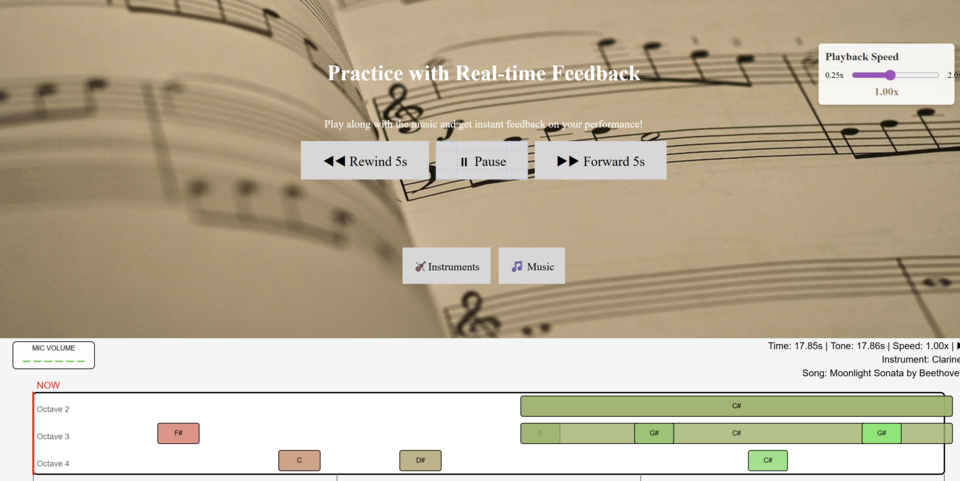
Each practice session begins by selecting your instrument and choosing a piece to train with. Every piece is a MIDI file, which means the entire score can be shown visually as notes sliding toward the present moment. When a note touches the now marker, that is your cue to play. Hold it until the block passes, and Musication evaluates timing, pitch and duration.
The AI listener hears what you play and identifies pitch, octave, onset and sustain. Your performance is compared to the expected track, and you receive instant feedback on accuracy. Early or late attack, too short or too long held notes, sharp or flat pitch, and timing consistency are all analyzed and displayed.
Using Musication Effectively
Headphones are highly recommended. When practicing, you often need to hear backing parts, accompaniment, or reference tracks generated from the MIDI file. Without headphones, your microphone may pick up the system audio and create feedback or detection errors.
The Settings page lets you tune your listener sensitivity and clarity thresholds. You can choose between the Standard listener and the AI-enhanced listener. Both detect pitch, but the AI model is trained to handle human tone variations, noisy environments and expressive dynamics far more accurately. Use the AI model whenever possible.
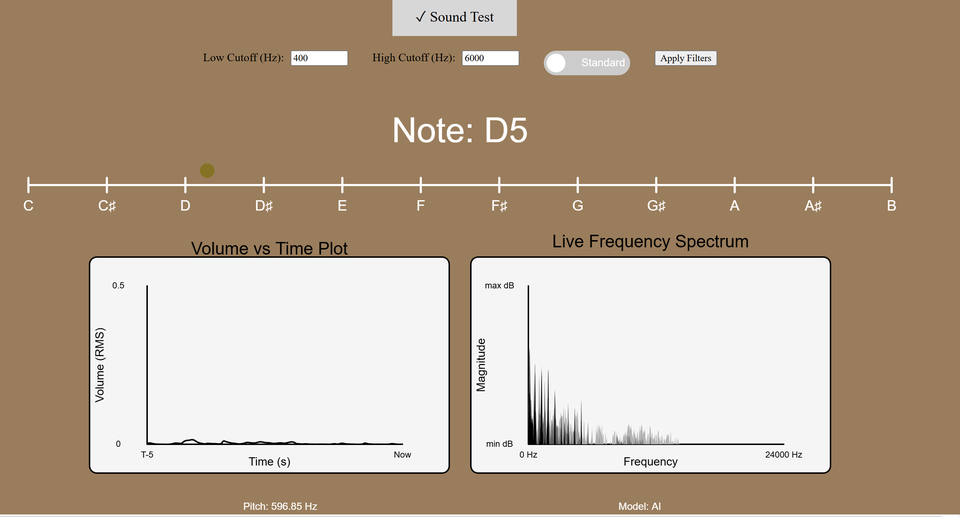
The Tuner page is the best place to configure sensitivity before practicing. You can see volume over time, live FFT spectrum, and the exact note the listener detects. Play a few notes, adjust clarity and smoothing, and once your readings are stable you are ready to practice.
Once you move to the Practice page, you will see:
"Practice with Real-time Feedback
Play along with the music and get instant feedback on your
performance!
◀◀ Rewind 5s ▶ Start Practice Session ▶▶ Forward 5s
🎻Instruments 🎵 Music"
Choose your instrument, choose your song, and play as notes scroll in. The system listens and grades continuously. Over time, you begin to feel rhythm more naturally, correct pitch faster, and learn pieces with measurable improvement.
Why Musication Exists
Learning music should feel interactive, measurable and adaptive. Musication was designed to give musicians immediate insight into how they sound, instead of guessing. Whether you are new or experienced, feedback in real time helps you improve faster than any traditional method.
- Real-time pitch and timing evaluation
- MIDI-driven song practice with visual note tracking
- AI model for advanced pitch and onset detection
- Tuner and FFT display for audio calibration
- Instrument selectable practice modules
Ready to Start Your Musical Journey?
Pick a piece. Play it boldly. Improve with every note.
▶ Start Practicing Now